Transcript Generator
Use VidBee’s transcript generator to turn videos and recordings into searchable, exportable text on your own computer.
Download VidBee for desktopStart with your source
Why local
Your video and audio stay on your computer. VidBee recognizes speech there, without uploading the media to a transcription server. Download a speech model once, then reuse it offline.
Read the privacy policy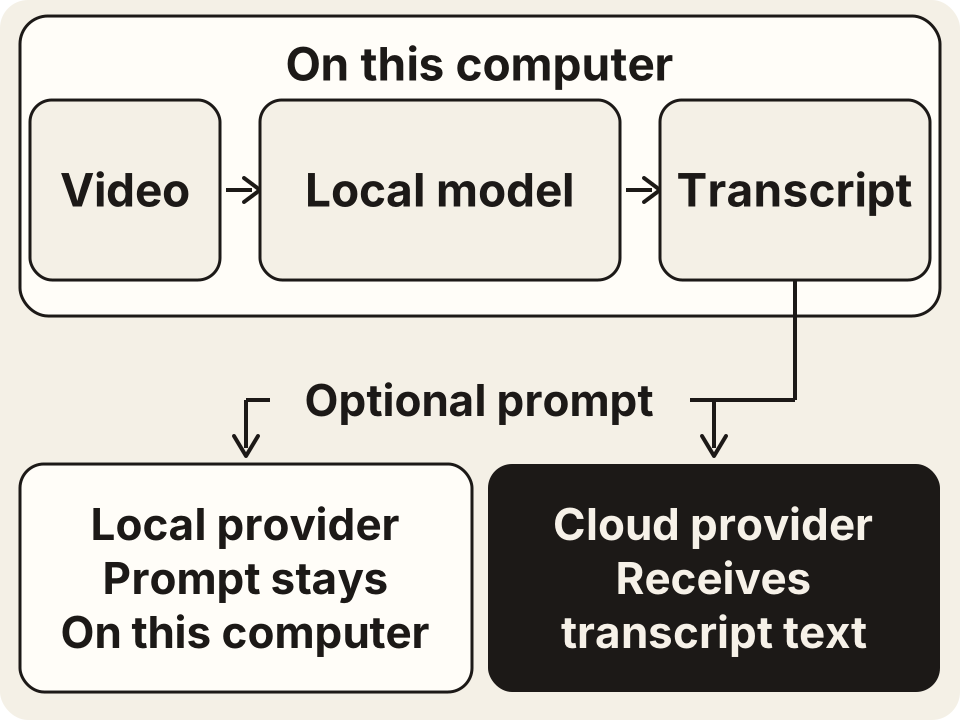
What you can do with a transcript
Search and jump to the moment
Find a word or phrase, then click its transcript line to play that moment. Use the timestamps to check the surrounding audio before copying a quote.
Follow different speakers
Speaker labels separate the voices in an interview or meeting. Review the labels and important names against the recording before sharing the text.
Export TXT, MD or SRT cues
Save plain text or Markdown for your notes. For SRT-formatted cues, choose Subtitles with timestamps enabled, export TXT, then change the saved file’s extension to .srt.
Use your own AI for the next step
Summarize or translate the transcript with your chosen AI provider. Ollama or LM Studio can keep prompts local; an optional cloud provider receives the transcript text.
See real transcript results
These demo recordings were generated, then transcribed with VidBee’s local speech engine. Expand a sample to read the timed lines and play its audio. The text is the original recognition output, including errors.
Interview: planning a community garden00:5014 timed lines · Whisper Tiny int800:00Today we are planning a community garden, Jordan, where should a small neighborhood group begin?Read transcriptHide transcript
- 00:00–00:05
Today we are planning a community garden, Jordan, where should a small neighborhood group begin?
- 00:05–00:09
Start with a place that people can reach on foot, and ask who can help each week.
- 00:09–00:11
We have a sunny corner beside the library.
- 00:11–00:14
What should we check before we plant anything?
- 00:14–00:15
Check out!
- 00:15–00:22
Check access to water first, carrying buckets across the street gets difficult very quickly, so water comes before buying seeds.
- 00:22–00:25
How much sunlight do vegetables actually need?
- 00:25–00:30
Watch the space over a whole day, tomatoes need more sun than leafy greens do.
- 00:30–00:32
you, a few neighbors suggested starting with herbs.
- 00:32–00:35
Would that make the first season easier?
- 00:35–00:39
Yes, herbs are useful in a small space, and people can harvest a little at a time.
- 00:39–00:43
What would you put in the first race bed if the group has never gardened before?
- 00:43–00:45
I would try lettuce.
- 00:45–00:50
Radishes and a few herbs , keep the first planting small enough to manage .。
How to record clear interview audio01:108 timed lines · Whisper Tiny int800:00Clear interview audio starts before you press record.Read transcriptHide transcript
- 00:00–00:03
Clear interview audio starts before you press record.
- 00:03–00:06
In this tutorial we will set up the room and microphone.
- 00:06–00:12
You do not need a large studio, a quiet room and careful microphone placement make a useful starting point.
- 00:12–00:15
First, listen to the room for 10 seconds.
- 00:15–00:30
seconds, check the fan, traffic outside, and anything that harms, turn off a noisy fan if it is comfortable to do so, and move away from an open window, a room with curtains and a rug usually has less echoed in an empty room with hard walls, put the microphone.
- 00:30–00:45
closer to the person speaking, moving at a little closer is often better than raising the gain, keep the microphone out of the camera frame if you want a clean shot, but do not move it across the room, ask your guest to speak at their normal volume, a test recorded in a whisper
- 00:45–01:00
As per will not tell you much, record a short test and listen with headphones, make sure you can hear every word without a harsh crackle, watch the input meter while the guest speaks, leave some room for a louder laugh or an excited answer, if the signal clips, lower the input
- 01:00–01:10
clip with level and make another test, clipping cannot be fixed by turning down playback, use headphones to catch problems early, the camera screen can not show you a loose cable or a rustling shirt.
3 tips for better phone videos00:4311 timed lines · Whisper Tiny int800:00Here are three ways to make your phone videos clearer.Read transcriptHide transcript
- 00:00–00:03
Here are three ways to make your phone videos clearer.
- 00:03–00:05
First, face a window and use the natural light.
- 00:05–00:08
Keep the window in front of you, not behind you.
- 00:08–00:10
Second, put your phone at eye level.
- 00:10–00:13
Use a shelf or a small stand so the frame stays still.
- 00:13–00:15
Look at the lens window.
- 00:15–00:30
When you speak to the viewer, third, record a 10 second audio test, listen for traffic, a fan, or fabric touching the microphone, move closer if your voice sounds distant, check the picture and the sound before the full take, natural light, a step
- 00:30–00:31
Study phone and clear audio.
- 00:31–00:34
Save this checklist for your next short video.
- 00:34–00:39
Before the full recording, play the test once and check the words you planned to say.
- 00:39–00:43
A short video is easier to follow when the viewer can hear each sentence clearly.
Times mark transcript segments. Listen again before relying on names, numbers or a quotation.
Make your next recording searchable
Download the free, open-source desktop app for macOS, Windows or Linux. Add a recording, get its transcript and keep the result on your computer.
Download VidBee for desktop